80 series Software
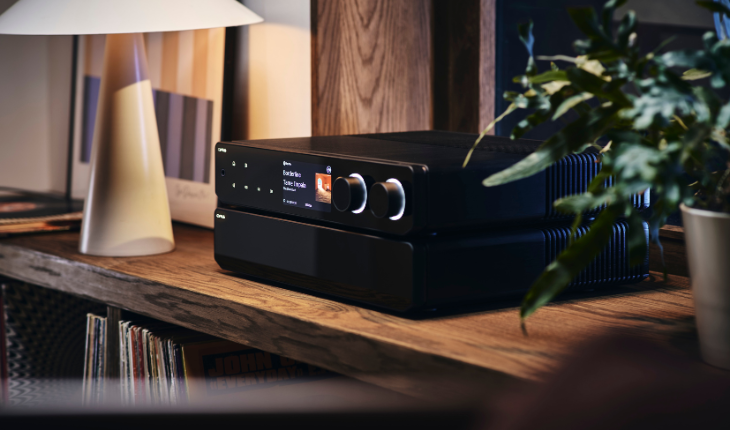
The 80 AMP and 80 PRE both have BluOS streaming built into the products, which means that all software upgrades are managed via the BluOS app. The app is available to download on both IOS & Android mobile devices and also Windows & Mac OS for PC/laptops.
The BluOS app will automatically check for updates whenever it is being used, and will instruct you that one is available. If an update is available, it will begin to download automatically and the product will go into upgrade mode. Please DO NOT turn off or unplug the unit after this has begun.
Once the download has begun, the supplied remote control is used rather than the BluOS app to progress through the entire upgrade procedure.
Check Manually
If you would like to check your product manually for an available upgrade, please follow the following steps.
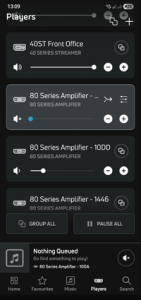
- If you have multiple BluOS products on the same network, you will need to select the correct player. Go to Player on the bottom menu and then select the correct product from the list shown. If you only have 1 product, you will not need to do anything for this step.
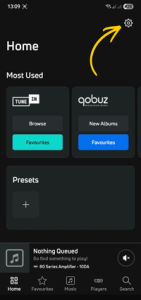
- Go to the Home page via the bottom menu, and then go to settings by clicking on the cog in the top right of the screen.
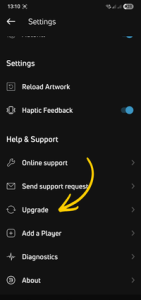
- When you are in the settings, scroll down to Upgrade and click the link. If an upgrade is available, this will begin automatically.
- After the upgrade has begun, please then follow all instructions on the display of your unit and progress through the upgrade by using the remote control supplied.